Most small business websites in Thailand have the same problem: they look fine, the owner is proud of them, and almost nobody finds them on Google. Not because SEO is magic, and not because the business needs to spend a fortune on an agency. Usually a handful of basic things were never done.
This guide covers those things, in the order we would do them ourselves for a new client. You can do most of it without a developer. Where you can't, you'll at least know what to ask for.
SEO in one sentence: make one clear, fast page for each thing your customers search for, prove to Google that real people trust your business, and give it time.
Step 1: Connect Google Search Console (30 minutes, free)
Google Search Console is a free tool that shows how Google sees your website: which searches you appear for, how often people click, which pages are indexed and what's broken. If you do only one thing from this guide, do this.
- Go to Google Search Console and add your website as a "Domain" property.
- Verify ownership. Your web developer or domain provider can add the verification record in a few minutes.
- Submit your sitemap (usually yoursite.com/sitemap.xml).
- Come back after two weeks and open Performance. The list of searches you already appear for is the most useful SEO data you will ever get, and it's free.
While you're at it, add your site to Bing Webmaster Tools too. Bing is small in Thailand, but several AI assistants draw on its index. Our guide to getting your website ready for AI search explains why that matters now.
Step 2: One page for each thing people search for
This is the step most small business sites miss. If you offer company registration, accounting and visa services, and all three sit in a list on one "Services" page, Google has no single page to show for "visa services Bangkok". Your competitor with a dedicated page will win almost every time.
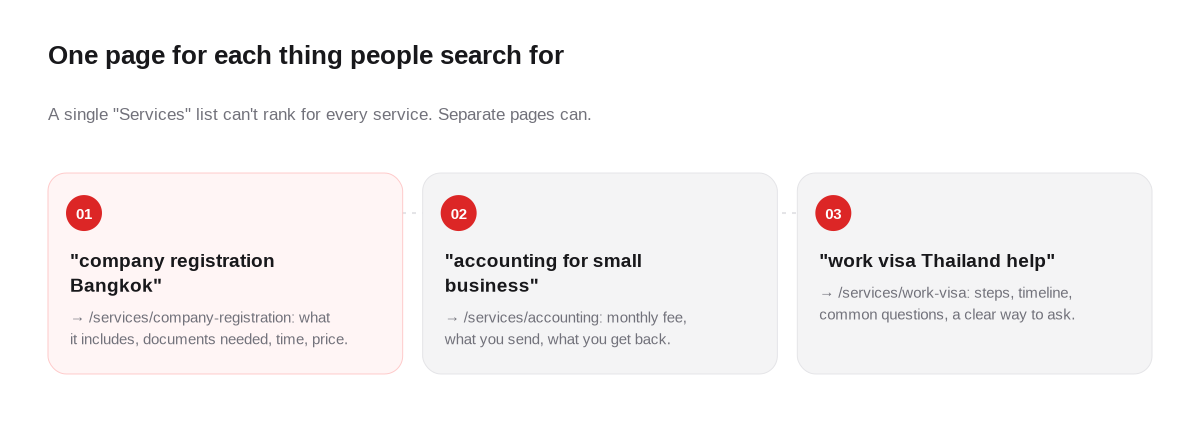
- Make a page for each main service or product type, with its own clear heading.
- Write it for the customer, not for Google: what it is, who it's for, what's included, how much it costs (or a starting price), how long it takes, and how to get in touch.
- Use the words your customers use. They search "รับทำบัญชี" not "บริการด้านการจัดทำบัญชี", and "website for my restaurant" not "digital hospitality solutions".
- If you serve Thai and foreign customers, give each page a Thai and an English version. Each version can then rank for searches in its own language.
Step 3: Titles and descriptions that earn the click
The title is the blue line people see in Google. It's the single most important line of text on each page, for ranking and for getting the click. Each page needs its own.
- Keep it under about 60 characters, so Google doesn't cut it off.
- Put the main search first, then what makes you different: "Accounting Services in Bangkok — Fixed Monthly Fee | YourBrand".
- Write a description of about 150 characters that answers "why should I click this one?". Google doesn't always use it, but when it does, it's your ad.
- Never reuse the same title on several pages. Duplicate titles make pages compete with each other.
Step 4: Speed and phones
Most people in Thailand look for businesses on their phones, often on mobile data. Google ranks pages partly on how quickly they load and how stable they feel on a phone (its Core Web Vitals). A site that takes five seconds to show anything loses visitors before they read a word.
- Compress images and use modern formats like WebP. Photos straight from a camera or phone are usually ten times bigger than they need to be.
- Remove plugins, sliders, chat widgets and tracking scripts you don't really use.
- Test your homepage with Google PageSpeed Insights, on the mobile tab.
We wrote a whole guide on website speed and Core Web Vitals if you want to go deeper.
Step 5: Google Business Profile (the biggest lever for local searches)
For searches like "dentist near me", "ร้านกาแฟ อารีย์" or "accountant Sukhumvit", Google shows a map with three businesses before any website. Those three come from Google Business Profile, not from your website's SEO.
A complete, active profile, with the right category, accurate hours, real photos, your services and regular posts, is often the fastest way for a local business to get found. It's free. Our step-by-step Google Business Profile guide for Thailand walks through every setting.
Step 6: Reviews
Reviews help you rank in the map results, and they help people choose you once they see you. Ask every happy customer, at the moment they're happiest (right after the job is done), with a direct link sent on LINE. Reply to every review, good or bad, politely and in the reviewer's language.
Never buy reviews or write them yourself. Google removes them, can penalise the profile, and customers can usually tell.
Step 7: Content that answers real questions
Every business gets the same questions over and over: How much does it cost? How long does it take? Do you work with small companies? Can you do it in English? Each of these is a search someone is typing into Google right now.
Answer them properly, one question per article, in plain language, with real prices or ranges where you can. Two good articles a month will do more than ten short ones. Link each article to the service page it relates to, so readers (and Google) can find the next step.
Step 8: Links and mentions from other websites
Google still treats links from other trustworthy sites as votes of confidence. You don't need hundreds. A few relevant ones make a difference:
- Business directories and listings: your industry association, local chambers, Clutch or similar sites for your field.
- Partners and suppliers who can list you as a partner.
- Local media, community sites and blogs that write about your area or your industry.
- Keep your business name, address and phone number exactly the same everywhere.
Avoid anyone selling "1,000 backlinks for ฿999". Those links do nothing, or do harm.
Step 9: Measure, then repeat
Check Search Console once a month. Look for pages that appear in searches but get few clicks (improve the title), searches you appear for on page two (improve that page or write a better one), and pages with errors. Small, regular improvements beat one big "SEO project" every time.
How long does it take?
For a new website, expect weeks for Google to index the pages, and usually three to six months before the important searches move steadily. Local map results can improve faster once your Google Business Profile is complete and reviews start coming in. Anyone promising first place in a week is selling something else.
Common mistakes we see
- A beautiful homepage and nothing else. One page can't rank for twenty different searches.
- Text inside images. Google can't read the words in a poster image well. Put important text in real text.
- Changing the website and losing every old link. If you're redesigning, read our guide to redesigning a website without losing SEO first.
- Ignoring Thai. If your customers search in Thai, your pages need real Thai content, not only English.
Every website we build includes the technical basics: fast pages, a page per service, proper titles and descriptions, a sitemap, Google Analytics and Search Console set up. If you'd like a second opinion on your current site, send us the link. We'll tell you honestly what would help most.
A quick checklist
- Inspect key URLs in Search Console
- Align each service page with intent
- Check local listings and mobile UX
- Track actual leads and orders
Frequently asked questions
How can I get my business website on the first page of Google?
Create a clear, fast page for each service people search for, write good titles, set up Google Search Console and Google Business Profile, collect real reviews and earn a few relevant links. Nobody can guarantee position one, but these steps work.
How long does SEO take for a new website?
Google usually indexes new pages within weeks. Steady movement for important searches typically takes three to six months. Local map results can move faster.
Do I need to pay for SEO tools?
No. Google Search Console, Google Business Profile and PageSpeed Insights are free and enough for most small businesses.
Is Google Business Profile more important than my website?
For "near me" and local searches, the profile often matters more because it appears first. For everything else, your website does the work. You need both.
Should my website be in Thai or English for SEO?
Whichever language your customers search in, and often both. Each language version can rank for searches in its own language.
How can I check whether Google indexed my site?
Use Google Search Console URL Inspection for individual pages.
Does an SEO plugin guarantee rankings?
No. It helps manage technical settings but does not replace relevant content or a working website.